Meta Muse Is an AI Agent with Somewhere to Work
Most AI assistants still feel like a slot machine: type a question, wait for an answer, and decide what to do next yourself.
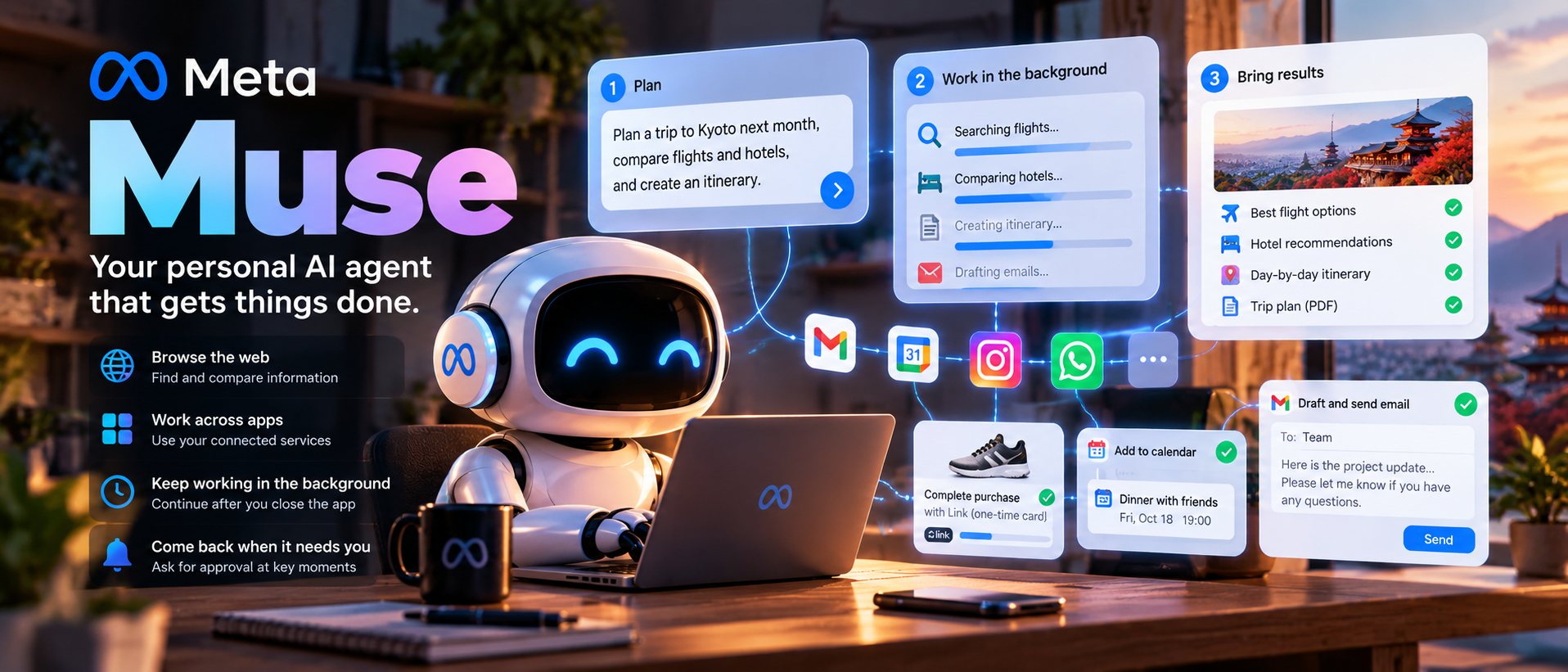
Meta Muse is trying to change that rhythm. Meta introduced it in September as a personal AI agent that can browse the web, work across connected apps, keep going after the app is closed, and come back when it needs a decision. The pitch is simple: tell Muse what you want done, then let it handle the middle.
The middle is where most of the work usually lives.
Muse is not just a new chat window
Meta’s own distinction is useful. A chatbot answers one question at a time. An assistant can carry on a more involved conversation and help produce something. A personal agent goes another step: it takes actions across the web and connected services, follows a multi-step plan, and continues working in the background.
That could mean booking a reservation, sending an email, monitoring a price, preparing a document, or keeping a recurring goal moving. It could also mean something less glamorous but more valuable—checking whether a calendar conflict appeared, keeping a grocery list current, or following up on a task that would otherwise disappear into a chat history.
Muse is designed to be used like a conversation with another person. People can message it in the Muse app or through WhatsApp. The interface is familiar; the expectation is not. The user is no longer asking only for information. They are handing over a piece of unfinished business.
The computer behind the agent
The most important part of Muse may be the least visible: Muse Secure VM.
Meta says every Muse runs on a dedicated virtual machine with its own browser. That machine stores the agent’s working environment, connected-service data, and credentials. Muse can open pages, fill out forms, and move through websites without borrowing the user’s everyday browser session.
This is a practical answer to a practical problem. An agent that can do real work needs somewhere to do it. If it runs directly inside a user’s laptop session, the boundary between “what I asked for” and “everything I happen to have open” becomes uncomfortably thin. A dedicated VM gives the agent a defined place to operate.
It does not make the agent harmless. It makes the access easier to describe.
What Muse can actually do
Meta’s examples span ordinary errands and longer-running projects:
- book appointments and travel;
- fill in online forms;
- send emails after asking for approval;
- research a topic and turn the findings into a document;
- watch prices or other changes in the background;
- create reminders and track goals;
- connect to email, calendars, Instagram, and other daily apps;
- make a purchase when the user approves the checkout.
There is a detail here that is easy to miss in the launch videos: Muse has its own file system and terminal as well as a browser. Meta says it can write code and build a small tool when a task needs one. It can also produce more than a chat reply—documents, PDFs, web pages, trackers, and interactive dashboards. Meta calls these richer outputs Artifacts.
The more interesting examples are the ones that build on context. Meta describes a user saving a recipe reel on Instagram. Muse could turn it into a grocery list, suggest a menu for a dinner party, remember guests’ dietary restrictions, and use those details when preparing invitations.
That kind of continuity is the reason a personal agent needs memory. It is also where the relationship becomes more complicated. The useful version of Muse has to remember enough to help, but not so much that the user loses track of what it knows.
It is proactive, but not meant to be noisy
Meta’s designers say Muse can run several tasks at once, continue on a schedule, and react to relevant events. It decides whether a background result is worth surfacing instead of sending a notification for every tiny update.
That sounds like a small product detail, but it may decide whether people keep the feature turned on. An agent that interrupts constantly is just another inbox. Muse lets users turn proactivity down or off, and the interface includes an activity log, a Goals view, and editable memory files so people can see what it is tracking.
The design team also chose a main conversation with side chats for separate projects. Users can send multiple tasks without waiting for the previous answer to finish. That makes Muse feel less like a queue of prompts and more like a person who can keep several threads in motion.
Background work changes the user’s role
For quick requests, there may be little difference between Muse and an ordinary assistant. The difference shows up when a task takes time.
Meta says Muse can keep working after the user closes the app and return when something changes or when approval is required. A person might give it a goal—sell a car, reduce a monthly bill, adjust a training plan—and let it work through the research and follow-up steps.
That is a more useful way to think about agents than “they can use a browser.” Browser control is an implementation detail. The product experience is closer to delegation:
- the user explains the outcome they want;
- Muse turns it into a plan and identifies the missing decisions;
- Muse does the reversible work;
- the user reviews the important moments;
- Muse continues until it finishes or gets stuck.
The hard part will be step four. A person needs enough visibility to know whether the agent is still following the original intent, especially after a website changes, a price moves, or a third party gives an unexpected answer.
Buying things without handing over your card
Meta says Muse can complete checkout through Link, Stripe’s wallet for agents. The system creates a one-time-use card so the agent does not need to see the user’s real card details. Meta also says eligible purchases receive Link’s purchase protections, including coverage for some damaged or lost items, price drops, no-fee returns, and a return guarantee.
Shop Pay and 1Password support were described as coming later. The 1Password integration is particularly notable because it would let Muse use existing logins without requiring the user to paste passwords into a conversation.
Payments are where convenience turns into a serious trust decision. A shopping assistant can save time, but a mistake is no longer just a bad paragraph. It can become a real charge, a wrong address, or a purchase made at the wrong moment.
Meta says Muse asks for confirmation before sensitive actions such as sending an email or making a purchase. That sounds obvious, but it is the line that makes the product usable. An agent should be allowed to gather options on its own; committing money or reputation should remain visible to the person who owns them.
The company says the default behavior is deliberately conservative: ordinary browsing can proceed, while actions that are hard to undo stop for a human decision. Users can make the defaults more or less cautious. In the product design notes, Meta calls the approval cards “deterministic” controls—clear Accept and Reject choices instead of another paragraph asking the model what it thinks.
The security design Meta describes
Meta’s launch materials put unusual emphasis on the computer around the model. The company describes several layers:
| Layer | What it is meant to do |
|---|---|
| Dedicated VM | Keeps each person’s agent, data, and connected credentials in an isolated cloud computer. |
| Sentinel agent | Sits separately from Muse at the system level and approves internet access or asks the user for permission. |
| Credential handling | Lets Muse use stored credentials without exposing the passwords themselves. Meta also says Muse cannot see passwords typed directly into the browser. |
| Approval prompts | Requires confirmation for sensitive actions, including sending email and making purchases. |
| Audit trail | Shows what Muse has done and what it plans to do. |
| User controls | Lets people choose connected apps, adjust access, disconnect services, and ask Muse to forget particular memories. |
| Training choice | Meta says users can opt out of their interactions being used to train its AI models. |
One useful addition is the ability to inspect the memory itself. Meta says memory files can be read and edited directly, rather than treated as an invisible personality layer. That does not eliminate mistakes, but it gives users somewhere concrete to correct them.
Meta also says conversations and data inside the VM are not shared with its advertising systems. Later in 2026, the company plans to introduce Muse Confidential VM, where the full VM—including its data and conversations—is encrypted with a key held only by the user.
These are good design choices on paper. The part that will matter in practice is how easy the controls are to understand while a task is in progress. Security settings that exist but are buried in an account page do not help much when an agent is halfway through a purchase.
Muse is powered by Muse Spark
Under the hood, Muse runs on Muse Spark, Meta’s model for agentic work. Meta says Spark is trained to make plans, use tools, handle messy inputs, and follow a task through instead of stopping after the first response.
Earlier Meta AI updates showed Spark handling daily briefings, email and calendar connections, research, slides, and recurring plans. The model is also used for coding and multimodal work elsewhere in Meta’s product line.
That shared foundation matters because a personal agent needs more than language ability. It has to read a page, understand a form, keep state across several actions, notice when the situation has changed, and know when to ask the user instead of guessing.
No model gets all of that right all the time. The product will be judged less by its best demo than by how gracefully it handles a half-completed task, an ambiguous instruction, or a website that refuses to cooperate.
Personal use, small business, and the device roadmap
Meta initially announced Muse for the United States, then described it as available in the US and Canada in its small-business rollout. The core product is available on iOS, Android, and muse.ai, with a Mac desktop experience also being introduced. Meta says AI-glasses support is planned, and its September Connect announcements described Muse running on glasses so it can act on what the wearer is looking at.
The small-business update is more than a marketing footnote. Meta added connectors for services including Asana, Box, Canva, Dropbox, Figma, Granola, HighLevel, QuickBooks, Klaviyo, Lovable, Notion, Shopify, Slack, Stripe, Zoom, Facebook Pages, Instagram professional accounts, and Meta ad accounts. Meta also says custom connectors are supported.
That pushes Muse beyond a household assistant. A small business owner could ask it to review sales and campaigns, flag urgent email, draft a new campaign, or look for unusual expenses—with the stated rule that nothing publishes, sends, or spends without approval.
At Connect, Meta also announced more shopping and work integrations, including Walmart, Best Buy, Sephora, Wayfair, PayPal, Notion, GitHub, and Box, with Expedia and Instacart described as coming soon. The connector list is likely to move quickly, so it is better to check the list inside Muse than rely on a static article.
Availability and feature limits can change during the rollout, so anyone outside the US and Canada should check the product itself rather than assume that the launch announcement applies to their account.
The privacy trade-off is the product
Muse is most helpful when it knows the user’s context: calendar, email, saved posts, preferences, shopping habits, and ongoing goals. That is also the exact list of things many people do not want casually exposed to a new service.
Meta’s answer is to put the data in the Secure VM, isolate the agent, use a separate Sentinel layer, and keep the user in control of connections and approvals. Those protections are important. They do not remove the underlying trade-off.
Meta’s own design team is candid that this is an early product. The interface has to show enough of the agent’s work to make background execution understandable without turning the user into a full-time supervisor. That is why the activity log, Goals view, memory editor, approval cards, and Ideas tab matter. They are attempts to answer a basic question: if Muse is working while I am away, how do I know what it thinks it is doing?
The question is not simply “Is Muse secure?” It is more specific:
- Which apps did I connect?
- Can Muse read, write, or send on my behalf?
- What does it remember?
- Which actions require approval?
- Can I see a complete history afterward?
- What happens when a connected service changes its login or permissions?
Users should be able to answer those questions without reading a security white paper. If they cannot, the system may be technically well designed and still feel untrustworthy.
My take
Meta Muse is interesting because it starts with a computer and a permission model, not just a larger chat box. The agent needs a browser, a place to store its working state, a way to use credentials without exposing them, and a clear handoff when the next step has consequences.
That is the right direction. The useful future of personal AI probably will not be one endless conversation. It will be a collection of small delegations: research this, watch that, prepare the options, remind me when the situation changes, and ask before you commit me to anything.
Muse is an early attempt to make that feel normal. Whether people trust it with real life will depend on the unglamorous details—logs, approvals, disconnect buttons, memory controls, and what happens when it makes a mistake.
The agent that saves ten minutes by booking a table is convenient. The agent that quietly understands when not to act is the one people might actually keep.
Sources and notes
This article is based on Meta’s Introducing Muse, How We Designed Muse, the Muse product overview, Meta’s Muse for Small Business, the Connect 2026 update, and Meta’s earlier overview of Meta AI taking action with Muse Spark. Product availability, connectors, features, and plan limits may change during rollout; Meta’s current product documentation should take precedence.